 Rebuild or move




 Romana
 Deutsch
 Français
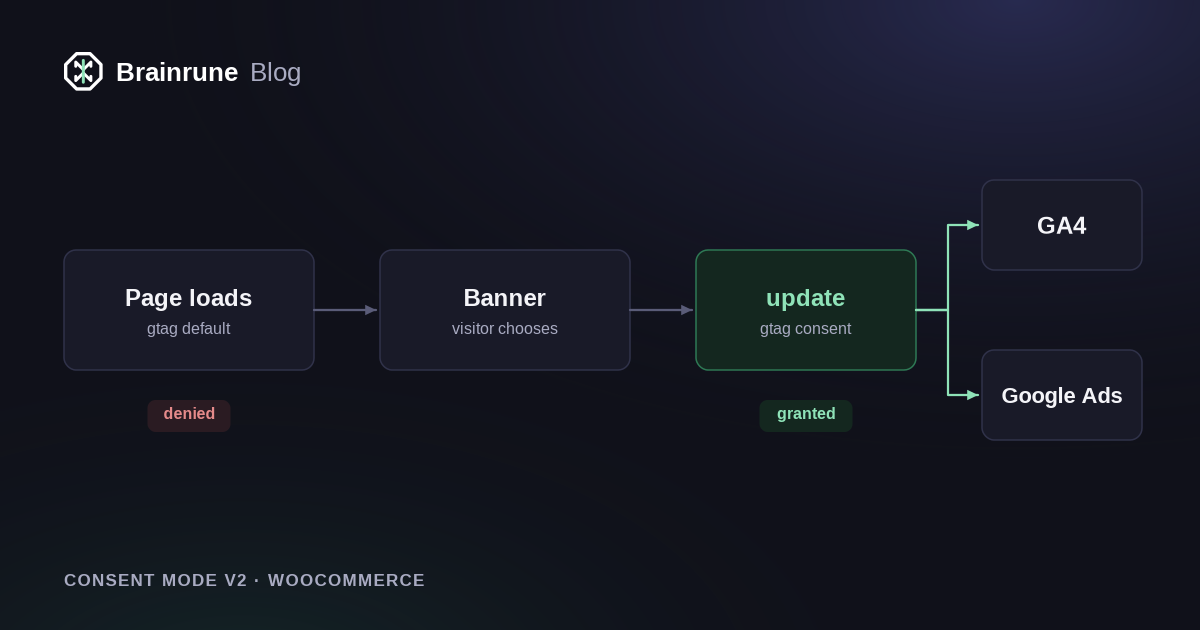
Google Consent Mode v2 tells Google tags whether a visitor accepted cookies, so Google Analytics 4 and Google Ads change what they collect. On a WooCommerce store the setup itself is small: one default command, one update command, and a cookie banner that sends the update. Most stores get it wrong on order, not on code.
This guide covers what the two commands do, how basic and advanced mode differ, what you lose in the European Economic Area without it, and how to check your setup in Tag Assistant before you trust your reports.
Key takeaways
- The default command must run on every page before any Google tag, including GTM.
- Consent Mode v2 adds two signals,
ad_user_dataandad_personalization, on top ofad_storageandanalytics_storage.- Basic mode blocks tags until the visitor chooses. Advanced mode loads tags and sends cookieless pings when consent is denied.
- Without the v2 signals, EEA traffic cannot feed remarketing or personalized ads.
- Tag Assistant’s Consent tab shows the default and the update state for every tag.
What is Google Consent Mode v2?
Google Consent Mode v2 is a set of signals your site sends to Google tags to say what a visitor agreed to. It does not show a banner. Your consent tool shows the banner, stores the choice, and passes it to Google through four consent types. Tags then decide what they are allowed to store and send.
The four consent types are:
| Consent type | What it controls | New in v2 |
|---|---|---|
ad_storage |
Cookies used for advertising, such as Google Ads click IDs | No |
analytics_storage |
Cookies used for analytics, such as the GA4 client ID | No |
ad_user_data |
Sending user data related to advertising to Google | Yes |
ad_personalization |
Using data for personalized ads and remarketing | Yes |
Google’s consent mode guide for websites describes the two v2 types the same way: ad_user_data covers sending advertising data, and ad_personalization covers personalized advertising. A banner that only knows the first two types is a v1 setup, even if it calls itself v2.
How do the default and update commands work?
The default command sets the consent state before the visitor makes a choice, and it must run on every page before any measurement command. The update command sends the visitor’s choice once they click accept or reject. Consent mode does not save choices, so your banner has to store them and resend them on each page.
The default command
A typical default for a store selling into Europe denies everything until the visitor answers:
gtag('consent', 'default', { 'ad_storage': 'denied', 'analytics_storage': 'denied', 'ad_user_data': 'denied', 'ad_personalization': 'denied', 'wait_for_update': 500 });
The wait_for_update value gives an asynchronous banner time to send its update before tags fire. Google’s example uses 500 milliseconds. You can also add a region parameter with ISO 3166-2 codes, so visitors from the EEA start as denied while visitors from other countries start as granted. When regions overlap, the more specific one wins.
The update command
When the visitor accepts, the banner calls:
gtag('consent', 'update', { 'ad_storage': 'granted', 'analytics_storage': 'granted', 'ad_user_data': 'granted', 'ad_personalization': 'granted' });
On the next page view, the banner reads its own cookie and sends the same update right after the default. If it forgets, every page after the first one looks like a denied visit.
Where the order breaks on WooCommerce
On WooCommerce stores we maintain, the usual problem is order. A theme or plugin prints GTM or gtag high in the <head>, and the consent tool loads later in the footer or after a delay script. The tags fire first and the default arrives too late. Check these points:
- The default runs inline in the
<head>, before GTM, gtag.js and any analytics plugin. - JavaScript delay or “load on interaction” features in your optimization plugin exclude the consent script.
- In GTM, the consent default uses the Consent Initialization trigger, not All Pages.
- The order received page, where the purchase event fires, loads the same consent script as the rest of the site.
- Only one tool sets the default. Two banners, or a banner plus a tracking plugin that also sets defaults, give conflicting states.
What is the difference between basic and advanced consent mode?
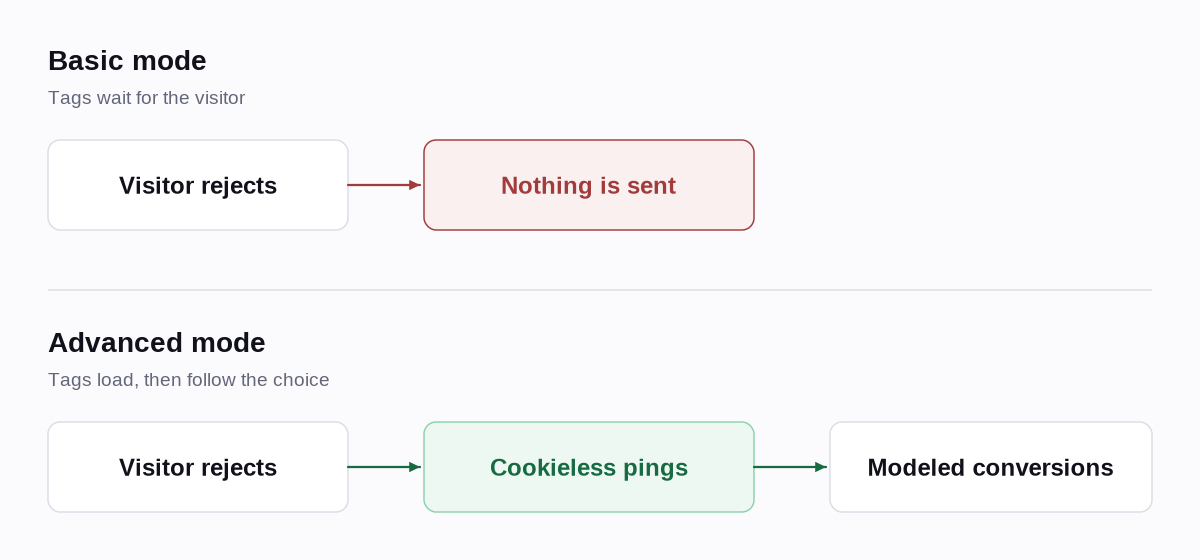
In basic mode, Google tags do not load at all until the visitor interacts with the banner. If they decline, nothing reaches Google, not even the consent state. In advanced mode, tags load immediately and send cookieless pings while consent is denied. Google uses those pings to model the conversions it cannot observe.
Google’s About consent mode page spells out the trade off. With basic mode, conversion modeling in Google Ads relies on a general model. With advanced mode, it uses an advertiser-specific model built from your own pings.
| Basic | Advanced | |
|---|---|---|
| Google tags load before a choice | No | Yes |
| Data sent when consent is denied | Nothing | Cookieless pings, no cookies |
| Conversion modeling | General model | Advertiser-specific model |
| Setup effort | Block tags until consent | Default plus update, tags always present |
| Legal review | Simpler to defend | Ask your adviser whether cookieless pings are acceptable for you |
Which one you pick is a legal and business decision, not a technical one. Google’s own guide tells you to follow your company’s guidelines. Many smaller stores start with basic mode and move to advanced after their privacy adviser reviews it.
What happens on WooCommerce without Consent Mode v2 in the EEA?
Without the v2 signals, Google treats EEA visitors as if they did not grant advertising consent. According to Google’s consent mode reference, ad_user_data is required for enhanced conversions and tag-based conversion tracking, and both new signals must be granted for personalized advertising. Remarketing lists stop growing from that traffic.
In practice the symptoms on a store look like this:
- Google Ads conversions from European visitors drop while orders in WooCommerce stay the same.
- Remarketing audiences shrink or stop growing.
- Enhanced conversions show warnings in the Ads interface.
- GA4 reports fewer users than the store has customers, with no modeling to fill the gap.
The consent mode reference in Analytics Help lists exactly which features stop receiving data when each signal is denied. It is worth reading before you decide which tags may run without consent.
How do you set up Consent Mode v2 on WooCommerce?
Install one consent tool that supports all four v2 signals, make it set the default in the head before any Google tag, connect its accept and reject buttons to the update command, and remove other plugins that set consent. Then test the result in Tag Assistant, both before and after you click the banner.
- Pick one consent source. A consent management plugin, a GTM template, or your own code. Not two.
- Map categories to signals. “Marketing” usually maps to
ad_storage,ad_user_dataandad_personalization. “Statistics” maps toanalytics_storage. - Set regional defaults. Denied for the EEA, the UK and Switzerland if you sell there. Decide with your adviser what other regions get.
- Load the default first. Inline in the head, excluded from JavaScript delay and minification that could reorder it.
- Send the update on every page. On click, and again on each page load from the stored choice.
- Check the purchase page. Place a test order and confirm the purchase event carries the right consent state.
- Clear caches. Purge the page cache and any CDN cache after changes, so visitors do not get old HTML with the old order of scripts.
If you want the banner and the signals handled by one plugin, our Cookie Consent for WooCommerce sets the v2 default and update for you and works with the tracking setup described in our WooCommerce tracking service.
How do you verify Consent Mode in Tag Assistant?
Open Tag Assistant, connect it to your store, and select a Google tag in the summary. In the Output section, open the Consent tab. The On-page Default column should show denied values before you touch the banner. After you accept, the On-page Update column should show granted values for all four types.
Google’s consent debugging guide notes that the Consent tab is empty when consent mode is not implemented on the page. That is the fastest check you can run. A short test plan:
| Step | What you should see |
|---|---|
| Open the home page in a private window | On-page Default shows all four types as denied (for EEA visitors) |
| Click “Reject” | No update, or an update with all types denied |
| Clear cookies, reload, click “Accept” | On-page Update shows all four types granted |
| Open a product page and a category page | Default then update on every page, not only the first |
| Place a test order | The purchase event fires after the consent update |
If the default appears after the first tag in the timeline, the order is wrong, even when the values look correct. Fix the load order before you look at anything else.
Common mistakes we see on WooCommerce stores
- Banner says v2, sends v1. Only
ad_storageandanalytics_storageappear in Tag Assistant. - Granted by default everywhere. The region setting was never configured, so EEA visitors start as granted.
- Delay scripts. A speed plugin delays the consent script until the first scroll, so the default arrives late.
- Two sources of truth. A tracking plugin sets its own default after the banner sets another one.
- Hardcoded tags in the theme. An old gtag snippet in
header.phpruns before everything else.
If you are not sure where your store stands, our free store audit includes a consent and tracking check.
Frequently asked questions
Is Google Consent Mode v2 a cookie banner?
No. Consent Mode only passes the visitor’s choice to Google tags. You still need a consent tool that shows the banner, stores the choice and sends the default and update commands.
Do I need Consent Mode v2 if I do not run Google Ads?
If you only use GA4, the analytics signal still matters, because it controls whether GA4 can set cookies. The two v2 signals matter most for Google Ads conversions, enhanced conversions and remarketing.
Should I choose basic or advanced mode?
Basic mode sends nothing until consent, which is simpler to defend. Advanced mode sends cookieless pings and gives better modeling. Ask your privacy adviser, then configure your consent tool to match.
Why does Tag Assistant show an empty Consent tab?
An empty Consent tab means consent mode is not implemented on that page, or the consent script did not run before the tag. Check that the default loads in the head and is not delayed.
Does page caching break Consent Mode on WooCommerce?
Usually not, because the choice is read from a cookie in the browser. It breaks when cached HTML still contains an old script order, so purge the page cache after every consent change.