 Rebuild or move



 Romana
 Deutsch
 Français
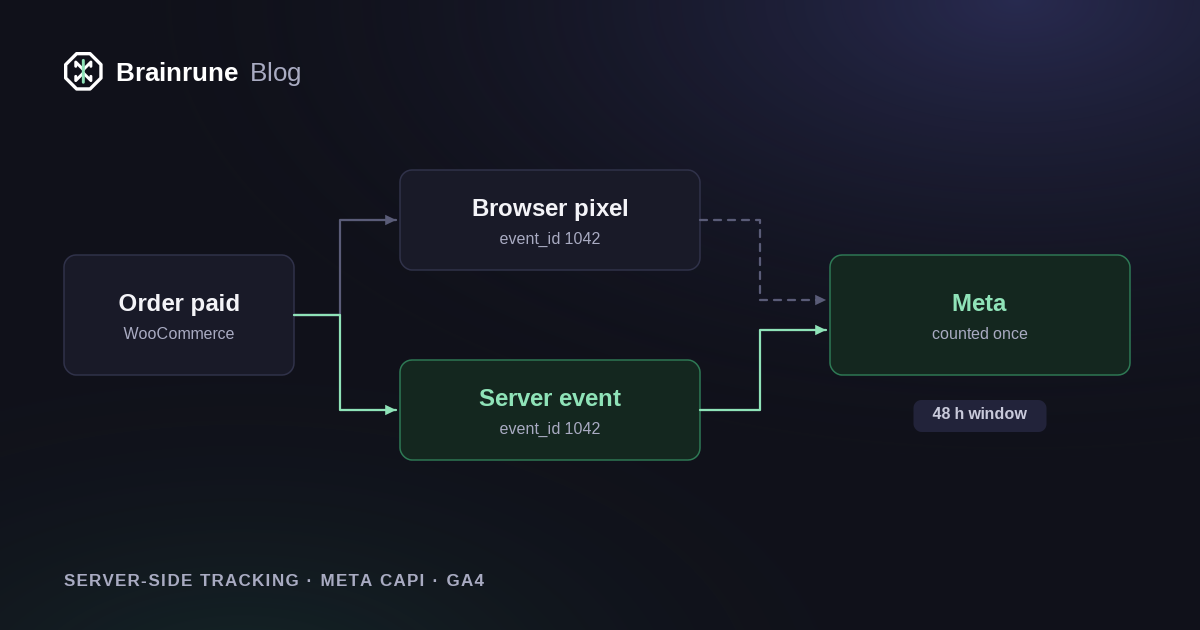
Server-side tracking means your WooCommerce server sends conversion events straight to Meta and Google, instead of relying only on a script in the shopper’s browser. The browser pixel still runs. The server adds a second, steadier copy of the events that matter most, like purchases, and the ad platform merges the two.
This article explains why browser pixels miss conversions, how the Meta Conversions API and the GA4 Measurement Protocol fit in, how deduplication with event_id works, and which customer data you can send without crossing legal lines.
Key takeaways
- Browser pixels miss events when scripts are blocked, cookies are limited, or the thank-you page never loads.
- Server events fire from WooCommerce itself, usually when an order is paid.
- Meta merges browser and server events when
event_nameandevent_idmatch, within 48 hours.- Server-side tracking does not replace consent. If the visitor said no, the server should not send marketing events either.
- Hash email, phone and name with SHA-256 before sending them to Meta. Never hash the IP address or user agent.
What is server-side tracking for WooCommerce?
Server-side tracking for WooCommerce is a setup where the store’s server sends events such as Purchase or AddToCart directly to ad and analytics platforms through their APIs. For Meta that is the Conversions API. For GA4 it is the Measurement Protocol. It runs alongside the browser pixel and fills the gaps the pixel leaves.
The browser pixel is a JavaScript file. It only works if the browser downloads it, runs it, and lets it set cookies. A server event is an HTTPS request from your hosting to Meta or Google. It does not care whether the shopper uses an ad blocker or closed the tab early.
| Browser pixel | Server event | |
|---|---|---|
| Where it runs | Shopper’s browser | Your WooCommerce server |
| Blocked by ad blockers | Often | No |
| Needs the thank-you page to load | Yes | No, it can fire on order status change |
| Sees page views and scrolls | Yes | Only what you send |
| Needs consent for marketing | Yes | Yes |
Why do browser pixels miss WooCommerce conversions?
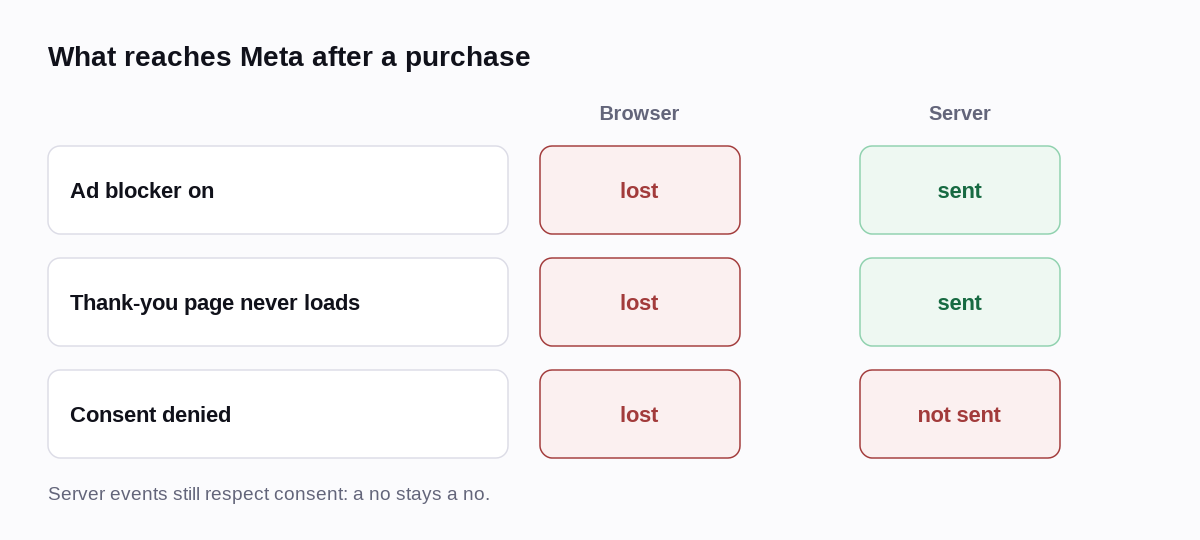
Browser pixels miss conversions because they depend on the shopper’s browser cooperating. Ad blockers and privacy extensions block the scripts. Browsers limit how long script-set cookies live. Some shoppers pay through an external gateway and never return to the thank-you page. Slow pages and JavaScript errors stop the pixel before it fires.
On WooCommerce the most common gaps we find are:
- Payment redirects. Card 3-D Secure, PayPal or bank transfer pages send the shopper away. If they close the tab before the redirect back, the browser Purchase never fires.
- Blocked scripts. Content blockers stop requests to Meta and Google domains.
- Consent refusals. A visitor who rejects marketing cookies should not be tracked, by pixel or by server. This is a legitimate loss, not a bug.
- Caching and optimization. A delay script or a cached thank-you page prints stale order data or none at all.
- Theme errors. One JavaScript error earlier on the page stops every script after it.
Server events fix the first, second, fourth and fifth points. They should not fix the third. Treat any tool that promises to “recover” refused consents as a red flag.
How does the Meta Conversions API work with the pixel?
The Meta Conversions API receives events from your server through an access token tied to your dataset. You send the same events the pixel sends, with the same event names and a shared event ID. Meta keeps one copy of each event and uses the server copy when the browser copy is missing, which gives steadier reporting.
A typical WooCommerce flow for a purchase:
- The shopper places an order. WooCommerce creates it with an order ID.
- The plugin builds an event ID from the order, for example
purchase_10482, and stores it on the order. - When the order becomes paid, the server sends a Purchase event to the Conversions API with that event ID, the value, the currency and the hashed customer data.
- If the thank-you page loads, the pixel sends a Purchase with the same event ID.
- Meta sees two events with the same name and ID and keeps one.
Firing the server event on a status change, not on the thank-you page, is what makes it reliable. It also means failed or pending orders are not sent as purchases.
How does event_id deduplication work?
Meta treats a browser event and a server event as duplicates when two fields match: the pixel’s eventID equals the server’s event_id, and the pixel’s event name equals the server’s event_name. Meta only deduplicates events received within 48 hours of the first one with that ID. After that, a late copy counts again.
In the pixel, the event ID is the fourth argument of the track call:
fbq('track', 'Purchase', {value: 49.90, currency: 'EUR'}, {eventID: 'purchase_10482'});
Meta’s guide to deduplicating pixel and server events covers the details. On WooCommerce, these mistakes break deduplication most often:
- The pixel and the server generate their own random IDs instead of sharing one.
- The browser sends
Purchasewhile the server sendspurchase. Names must match exactly. - The server event is retried by a queue days later, outside the 48-hour window.
- A cached thank-you page prints the event ID of a previous order.
Where does GA4 fit in server-side tracking?
GA4 accepts server events through the Measurement Protocol, which needs your measurement ID, an API secret and the visitor’s client ID from the _ga cookie. Google says the protocol is meant to augment automatic collection, not replace it. Keep gtag or GTM in the browser and use the server for events the browser cannot see.
Google’s Measurement Protocol documentation is clear on that point. Good uses on a WooCommerce store:
- Purchases completed after an off-site payment, where the thank-you page often fails to load.
- Refunds created in the WooCommerce admin.
- Order status changes such as completed or cancelled.
- Subscription renewals that happen with no visitor on the site.
Store the client ID on the order at checkout, so the server event links back to the right session. Without it, GA4 counts the event but cannot attribute it to a source.
What customer data can you send legally?
Send only the data each platform needs to match the event, and only for visitors who gave marketing consent. For Meta, hash email, phone, names, city, postcode and country with SHA-256 before sending. Leave the IP address, user agent and the fbp and fbc cookies unhashed. Never send card data or order notes.
Meta’s customer information parameters page lists what must be hashed and what must not. A practical summary:
| Field | Send? | Format |
|---|---|---|
Email (em) |
Yes, with consent | Lowercase, trimmed, SHA-256 |
Phone (ph) |
Yes, with consent | Digits with country code, SHA-256 |
| First and last name, city, postcode, country | Optional | Normalized, SHA-256 |
| IP address and user agent | Yes | Plain, never hashed |
fbp and fbc cookies |
Yes, if present | Plain, never hashed |
| Card data, order notes, full address line | No | Not applicable |
Hashing is not anonymization. A hashed email is still personal data under GDPR, so the consent rules apply in full. For Google products, the EU user consent policy requires legally valid consent from users in the EEA, the UK and Switzerland for ad personalization. Your consent tool should decide, per order, whether the server is allowed to send the marketing event at all.
Server-side tracking checklist for WooCommerce
- One source per platform: a plugin or a server container, not both sending the same events.
- Shared event ID stored on the order and printed on the thank-you page.
- Server Purchase fires on paid status, not on page load.
- Consent state stored with the order and checked before each server event.
- Customer data normalized and hashed as Meta requires.
- GA4 client ID saved at checkout and reused for server events.
- Test events checked in Meta Events Manager and GA4 DebugView before going live.
- Failed requests logged, with retries inside the 48-hour window.
Our Pixel Tracking for WooCommerce handles shared event IDs and consent checks for Meta and GA4, and Pixel Tracking Pro adds the server events. If you would rather have someone set it up and verify the numbers, see our WooCommerce tracking service.
Frequently asked questions
Does server-side tracking replace the Meta pixel?
No. Meta expects both. The pixel sees browsing behavior the server does not, and the server catches events the browser misses. Send both with a shared event ID and let Meta deduplicate.
Can server-side tracking get around cookie consent?
It should not. Consent rules apply to the data, not to where the request starts. If a visitor rejects marketing cookies, do not send their events to Meta or Google Ads from the server either.
Why do I see double purchases in Meta after adding the Conversions API?
Deduplication failed. Check that the pixel and the server use the same event name and the same event ID, and that the server event arrives within 48 hours of the browser event.
Do I need a server container in Google Tag Manager?
Not always. A WooCommerce plugin can call the Conversions API and the Measurement Protocol directly from your server. A server container helps when you route many platforms through one place.
Which events should I send from the server first?
Start with Purchase, because it carries revenue and is most affected by payment redirects. Add refunds and order status changes next. Browsing events like ViewContent can stay in the browser.