 Rebuild or move




 Romana
 Deutsch
 Français
Once a store has more than a few hundred products or a physical shop next to it, someone ends up typing the same data twice: stock into WooCommerce, orders into the ERP, invoices into the accounting tool. A WooCommerce ERP integration removes that typing. Done well, nobody notices it. Done badly, it oversells stock, overwrites product texts at 3 a.m. and creates invoices twice.
Key takeaways
- Decide one source of truth per field before writing any code: the ERP owns stock, the store owns product texts, and so on.
- Stock and prices need frequent sync. Catalog data can sync nightly. Orders and invoices should move on events.
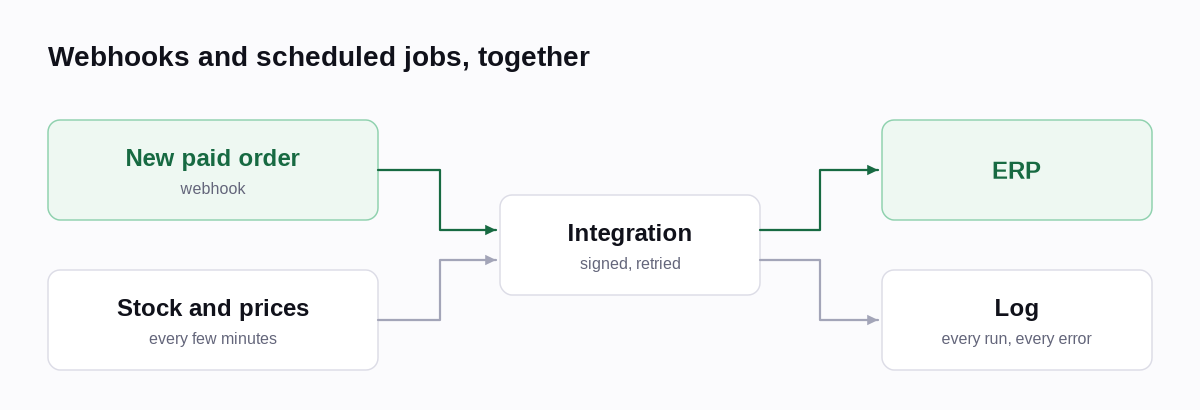
- Webhooks are fast but can stop silently. Scheduled jobs are slower but predictable. Most stable setups use both.
- Match products by a stable key, usually the SKU, and never create a product when the match fails.
- Logs and alerts are part of the integration, not an extra.
What does a WooCommerce ERP integration do?
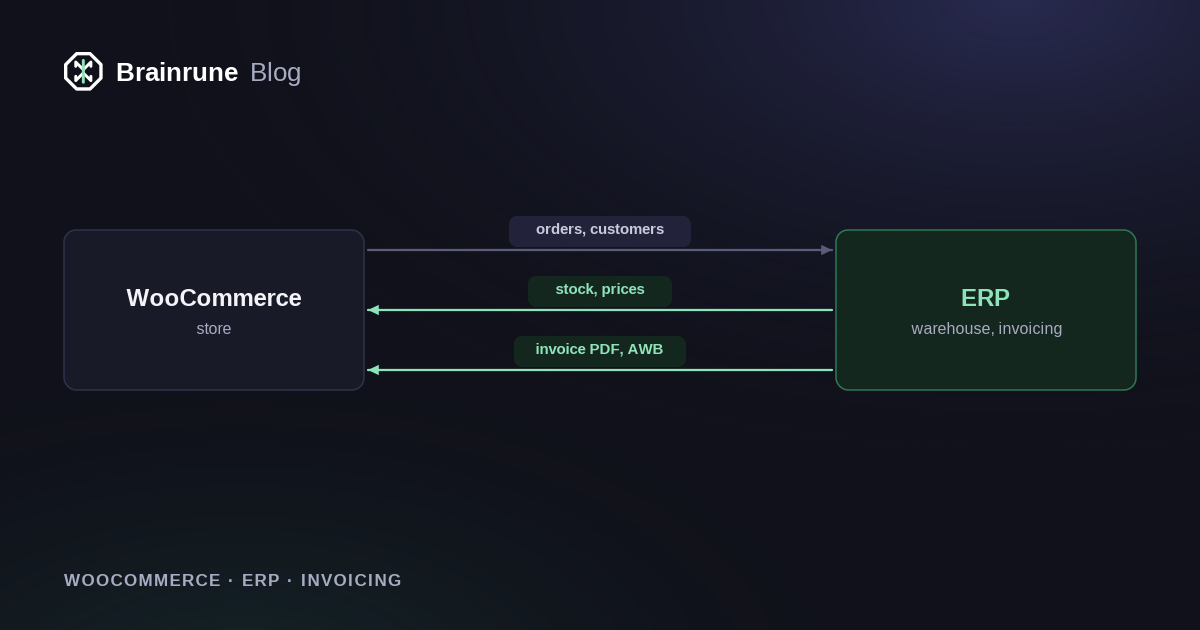
A WooCommerce ERP integration moves data between the online store and the system that runs the business: stock, prices and products from the ERP to WooCommerce, and orders, customers and payments from WooCommerce back to the ERP or invoicing tool. The goal is that each piece of data is entered once and appears everywhere it is needed.
The word ERP covers a lot here: a full ERP, a warehouse management program, a point of sale system with stock, or an invoicing and accounting tool. The questions are the same for all of them. What moves, in which direction, how often, and what happens when something fails.
What data should you sync, and in which direction?
Sync stock and prices from the ERP to the store, orders and customers from the store to the ERP, and invoices from the invoicing system back to the order. Product names, descriptions and images usually stay owned by the store, because they are written for search and for shoppers, not for the warehouse.
| Data | Usual source of truth | Direction | Typical frequency |
|---|---|---|---|
| Stock quantity | ERP or warehouse | ERP to store | Every few minutes, or on change |
| Regular and sale price | ERP | ERP to store | Every few minutes to hourly |
| New products, categories, attributes | ERP for codes, store for texts | ERP to store, create only | Nightly |
| Product names, descriptions, images | Store | None, or first import only | Never overwritten after launch |
| Orders | Store | Store to ERP | On creation or payment |
| Customers and billing data | Store | Store to ERP | With the order |
| Invoices and credit notes | Invoicing system | Created from the order, PDF back to the store | On payment or status change |
| Order status, tracking number | ERP, courier or store | To the store | On change |
The row that causes the most damage is product texts. If the nightly sync rewrites names and descriptions from the ERP, every SEO title and description written in WooCommerce is lost the same night. Keep text fields out of the sync once a product is live.
Which system should be the source of truth?
Each field should have exactly one owner. The ERP usually owns stock, cost and price because the physical shop, warehouse and accountant change them there. The store owns texts, images, categories as shoppers see them, and SEO fields. Two systems writing the same field is where conflicts start.
Write the ownership down in one table and keep it with the integration. When someone asks “why did the price change back?”, the answer is in that table, not in someone’s memory.
Should you use webhooks or scheduled sync?
Use webhooks for events that need to move right away, such as a new paid order, and scheduled jobs for bulk data such as stock and prices. Webhooks are fast but fail quietly if the receiver is down. Scheduled jobs are predictable and easy to retry. Most stable integrations combine both.
Webhooks
WooCommerce can call a URL every time an order, product, customer or coupon is created, updated or deleted. The WooCommerce webhooks documentation notes two details that matter in production: each delivery can be signed with a secret so the receiver can verify it, and WooCommerce automatically disables a webhook after more than five consecutive delivery failures. If the ERP is offline for maintenance, the webhook can switch itself off and orders stop flowing until someone notices.
Scheduled jobs
A scheduled job asks the ERP for changes every few minutes and writes them to the store, or reads new orders from the WooCommerce REST API and sends them on. Be careful how the job is triggered. The WordPress cron handbook explains that WP-Cron is not a real system cron: it checks for due tasks on page load. On a quiet night with no visitors, a “every 5 minutes” sync may not run at all. A real server cron or WP-CLI call is more reliable.
Queues for large batches
Writing 5,000 stock values in one request will hit PHP time limits. Split the work into small batches and run them through a queue. WooCommerce already ships Action Scheduler, a job queue that stores each task, runs due tasks in batches and logs each action’s start, completion and failure. It is a good place for integration work because failed batches are visible and can be retried.
How often should stock and prices sync?
Sync stock as often as it changes outside the store. If a physical shop sells the same items, every few minutes is a sensible target, plus a check of out of stock items. Prices change less often and can sync hourly. Full catalog updates can run once a night when the store is quiet.
Faster is not always better. Every stock write purges the page cache for that product and its categories, and a big batch at noon can make the store slow for shoppers. Sync only the products that changed since the last run, not the whole catalog every time. If the ERP cannot tell you what changed, compare against the last values you wrote and skip identical ones.
How do you handle conflicts and failures?
Handle conflicts by giving every field one owner, matching products by a stable key such as the SKU, and making every operation safe to repeat. When the ERP does not answer, write nothing and keep the old values. An empty answer from the ERP is not the same as zero stock.
- Matching. Match by SKU or ERP code. If a product cannot be matched, log it and skip it. Creating a duplicate is worse than missing one update.
- Repeat safety. Sending the same order twice must not create two orders or two invoices. Store the ERP document number on the WooCommerce order and check it before sending.
- Silent source. A timeout or an empty list from the ERP should stop the run, not set every product to out of stock.
- Overselling. Between two sync runs, the last unit can sell in both places. Keep a small safety buffer on fast moving items or reserve stock in the ERP when the web order arrives.
- Out of stock products. Decide what happens to pages when stock reaches zero. Deleting them breaks links that rank. Keeping them published and marked out of stock is usually safer.
How should invoices be issued from WooCommerce orders?
Issue the invoice in the invoicing system when the order is paid or reaches an agreed status, store the invoice number and PDF link on the order, and send it to the customer from the store. Refunds should create a credit note in the same system, linked to the original invoice, never a deleted invoice.
Pick the trigger on purpose. Card payments can be invoiced at payment. Cash on delivery is often invoiced at shipping or completion. Make sure the order carries the billing data the invoicing system needs, such as company name and tax ID for business buyers, and validate it at checkout rather than discovering gaps later.
What should the integration log?
The integration should log every run with start time, duration, how many items it read, changed and skipped, and every error with the product or order it concerns. It should also send an alert when runs stop or fail several times in a row, because a sync that stopped quietly is worse than one that failed loudly.
Per product history helps most in support. When a customer says the site showed 6 in stock and the shop had none, you want to see when the last stock value arrived and from where. On integrations we maintain, the first question after any complaint is answered from the log in a minute, not reconstructed from memory.
Checklist before you go live
- Ownership table: one source of truth per field, agreed with the people who use the ERP.
- Product matching key decided and checked for duplicates on both sides.
- Text and SEO fields excluded from updates after the first import.
- First runs done on a staging copy, with emails to customers switched off.
- Scheduled jobs triggered by a real cron, not only by visitor traffic.
- Webhooks signed with a secret, and a check that they are still active.
- Large writes split into batches through a queue.
- Rule for a silent or failing ERP: write nothing, keep old values, alert.
- Invoice trigger, refund flow and numbering agreed with the accountant.
- Logs readable by someone who is not a developer, and alerts going to a real inbox.
An integration also needs care after launch: WooCommerce and ERP updates change APIs, and a maintenance plan that tests updates on a copy catches breaks before customers do.
Frequently asked questions
Is a WooCommerce ERP integration done with a plugin or custom code?
Both exist. Ready plugins cover popular ERPs and invoicing tools. Custom code makes sense when the ERP has its own API, several warehouses must be combined, or the store needs rules a generic plugin does not offer.
Should stock sync in real time?
Only if stock changes in real time outside the store. For most stores, syncing changed items every few minutes plus a check of out of stock items is enough and easier on the server.
Can the ERP overwrite my product descriptions?
It can if the sync is set to update text fields. Exclude names, descriptions and SEO fields from updates once a product is live, and let the ERP only create new products.
What happens to orders if the ERP is offline?
With a queue, orders wait and are sent when the ERP is back. With plain webhooks, WooCommerce disables the webhook after more than five consecutive failed deliveries, so you need a check that turns it back on and resends missed orders.
Do I need the WooCommerce REST API for an integration?
If the integration runs outside WordPress, yes, it reads and writes through the REST API with its own keys. If it runs as a plugin inside WordPress, it can use WooCommerce functions directly.
Planning a connection to your ERP?
We build and maintain WooCommerce connections to ERPs, warehouse and invoicing systems, with the ownership table, queues and logs described above. See WooCommerce integrations for how we scope one.